
Play Android games on your PC with LDPlayer
LDPlayer is a free Android emulator for Windows. It puts a proper Android device inside your PC, so mobile games run on the big screen, with a keyboard, a mouse and far more power than a phone offers.
On this page
What LDPlayer is
LDPlayer is a free Android emulator made by XUANZHI INTERNATIONAL CO., LIMITED. An emulator is a translator: Windows cannot run Android apps on its own, so LDPlayer builds a virtual Android device inside your PC and translates between them, fast enough that games feel native. Sign in to Google Play, install your phone's games, and play them with keyboard, mouse or gamepad instead of thumbs.
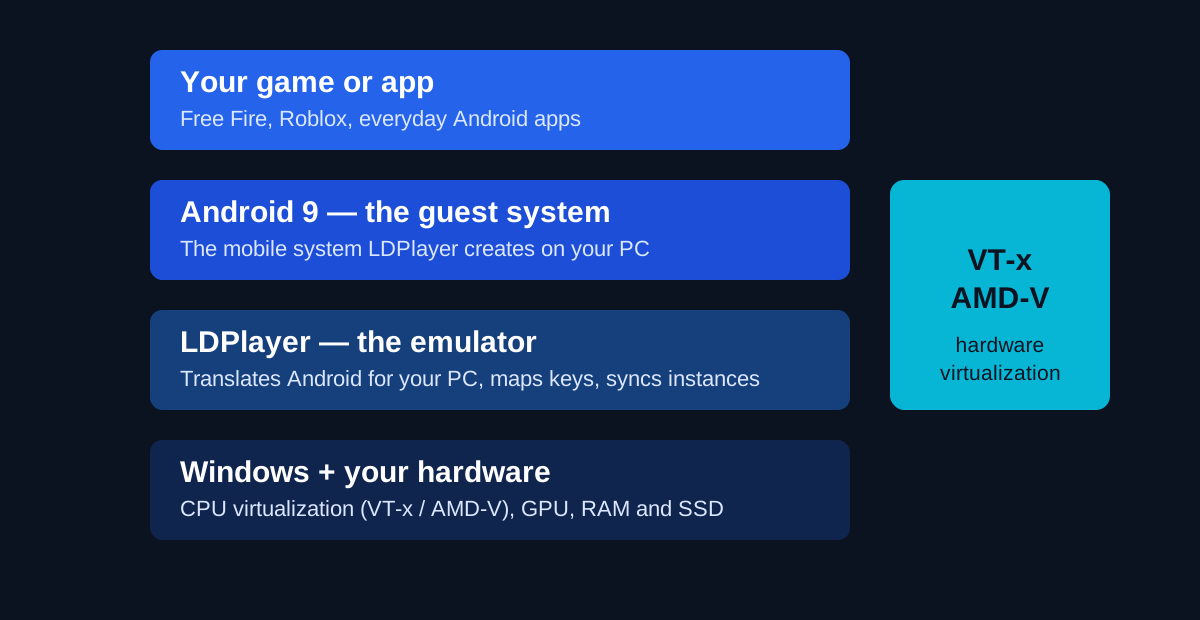
The current main line, LDPlayer 9, runs Android 9; a beta line on Android 14 sits on the same download page, rough edges and all. For almost everyone, the main line is the right starting point. Our what is LDPlayer guide walks through the idea slowly, with a diagram of the layers.
Two things LDPlayer is not. It is not a phone: no calls, no SIM, and apps that demand a real device's sensors can misbehave. And it is not a shortcut around a game's rules — each game sets its own terms about emulator play, worth a glance before you invest hours in an account.
How it works, in four steps
Windows starts a virtual Android device
LDPlayer uses your processor's hardware virtualization — Intel VT-x or AMD-V — to run Android as a guest system. That hardware path is why a modern emulator feels quick instead of simulated — and why enabling virtualization is the first fix in every troubleshooting guide, including ours.
You install games the normal way
Google Play is built in: sign in, search, install — the same routine as a new phone. APK files drag straight onto the window.
Your keyboard becomes the touchscreen
The keyboard mapping editor (F12 in a game) places keys on any on-screen control: WASD to move, a key to fire, the mouse to aim. Ready-made schemes ship for popular games; save a different layout per game. The keyboard mapping guide shows the whole setup.
Extra windows, same PC
The Multi-Instance Manager opens several independent Android devices at once — one per account — and the Synchronizer drives them all with one set of inputs: the feature gacha players buy fast PCs for. See multi-instance, explained.
Plan your settings before you install
Most "LDPlayer is slow" complaints are really setup complaints. Answer three questions and the planner builds a starting checklist from the developer's published guidance. It takes ten seconds and saves an evening of random tweaking.
LDPlayer Settings Planner
Tell it what you play and what your PC looks like. It hands back a checklist built from LDPlayer's own published guidance — treat every line as a starting point to test, not a promise. Settings live under the gear icon, mostly on the Performance and Display tabs.
Your starting settings
- Resolution: 1920 × 1080 — match the emulator to your display.
- DPI: 240 — the usual baseline for a 1080p screen.
- CPU cores: 4 — about half of a quad-core processor, as the official guidance suggests.
- RAM: 4 GB (4096 MB) for the instance — inside the official 4–6 GB guidance band.
- Frame rate: 60 FPS target — raise it only if your PC holds it without dips.
- Graphics renderer: OpenGL — if a game stutters or renders wrong, switch to DirectX and restart the instance.
- Virtualization: ON — check Task Manager > Performance shows "Virtualization: Enabled"; if not, turn on VT-x (Intel) or AMD-V (AMD) in BIOS. It is the single biggest speed-up.
- Leave Windows room: keep roughly half your CPU and RAM for the host — giving the emulator everything makes things worse, not better.
Platform
Windows PC — Windows 7, 8.1, 10 and 11. There is no native Mac or Linux version.
Price
Free to download and use. The current main line runs Android 9 on your PC.
Developer
XUANZHI INTERNATIONAL CO., LIMITED — downloads belong on their website, nowhere else.
Official source
The official LDPlayer website is the only download source this site links to.
| Platform | LDPlayer support | Notes |
|---|---|---|
| Windows 11 | Yes | Fully supported — the safest choice today. |
| Windows 10 | Yes | Fully supported. |
| Windows 8 / 8.1 | Yes | Listed in the official system requirements. |
| Windows 7 | Yes | Listed in the official system requirements; expect weaker performance on period hardware. |
| macOS | No native version | LDPlayer is a Windows program. Mac owners need a Windows virtual machine or a different emulator — see LDPlayer for Mac. |
| Linux | Not available | No official Linux build exists. |
| Android / iOS phones | Not applicable | LDPlayer runs on a PC, not on a phone. It creates the Android device inside Windows. |
Features that matter
Eight tools do the real work; the rest of the menu can wait.
Keyboard mapping
Place keys anywhere on screen, per game, and save the scheme. Ready-made layouts cover popular titles; most players adjust two or three keys, not build from zero.
Multi-instance
Run several Android devices at once — a main account, an alt, a reroll — each with its own apps and settings, managed from one panel.
Synchronizer
One click, one keystroke, every instance at once — tedious daily routines become a single pass.
Macros and operation recorder
Record a sequence of taps and clicks once, replay it with a single key. Built for repeatable routines, not for pretending to be three people in a ranked match.
High frame-rate support
Frame-rate settings reach 120 FPS on the current main line, for games that can use it and PCs that can hold it — the planner above suggests your target.
Screen recording
A built-in recorder captures gameplay without extra software — handy for clips, bug reports and boss-fight evidence.
Gamepad support
Plug in a controller; map it like the keyboard. Some games play better on sticks; LDPlayer never forces one input style on you.
APK install and virtual location
Drag an APK onto the window to install it; set a virtual location for apps that care where your device claims to be.
The layer cake: how Android runs on Windows
Picture the stack and every emulator problem makes more sense. Your game never talks to Windows directly: it talks to Android, Android talks to LDPlayer, LDPlayer talks to Windows and your hardware. When something stutters, one layer is the bottleneck — usually the bottom one, where virtualization is or is not on. Our requirements page translates each layer into the parts list it needs.
LDPlayer vs a phone vs other emulators
Three honest ways to play the same game. No universal winner — the right row depends on what you already own.
| Question | LDPlayer on PC | Your phone | Other PC emulators |
|---|---|---|---|
| Screen and controls | Big monitor, keyboard, mouse, gamepad | Small touchscreen, thumbs | Big monitor, keyboard and mouse |
| Several accounts at once | Yes — multi-instance with a synchronizer | One at a time, realistically | Some offer it; depth varies |
| Cost | Free | The phone you already own | Mostly free, some push paid tiers |
| Setup effort | One install, then per-game key layouts | None | One install, similar tweaking |
| Mac support | No — Windows only | Not applicable | A few publish Mac builds |
| Battery and heat | Your PC's problem, not your pocket's | Games drain and warm a phone fast | Your PC's problem |
The closest rival is BlueStacks, and the honest differences are narrower than fan arguments suggest. We put them side by side in LDPlayer vs BlueStacks — who each suits, and where the real gaps are.
One practical point the arguments miss: you are not marrying either program. Games, purchases and progress live in your Google and game accounts, not inside the emulator — trying LDPlayer for a week costs nothing but the download, and switching later loses nothing either. Judge it like a controller: by how your own games feel, on your own PC, with this page's settings applied.
Start with a guide
Eight guides, each written to finish one job. New here? Take them in order; everyone else, jump to your problem.
What is LDPlayer?
Start here. What an emulator actually is, the four layers under your game, and the limits nobody puts on the box.
Best LDPlayer settings
Virtualization first, then cores, RAM, resolution and frame rate — the five decisions that decide how LDPlayer feels.
Keyboard mapping
Open the editor, start from a preset, place the four controls every game needs, and save a scheme with a real name.
Multi-instance and the Synchronizer
Create, clone and budget extra Android windows — and drive them all with one set of inputs.
LDPlayer vs BlueStacks
Platform, focus, published guidance and the free question — plus a verdict by player type, not by fan club.
Fix LDPlayer lag
Five causes, checked in order — virtualization, allocation, graphics, resolution, background load — plus the ten-minute routine.
Who LDPlayer suits — and who should walk away
You will get on with it if…
- Your phone is too small, too hot, or too busy being a phone.
- You play something with real controls — a shooter, a MOBA, a strategy game — where thumbs are the bottleneck.
- You run more than one account and want them side by side, in sync.
- Your PC is mid-range or better and mostly sits idle while you play.
Walk away if…
- You own a Mac and only a Mac. There is no native version; the workarounds in our Mac guide are honest about their limits.
- Your PC is below the official minimums — an emulator cannot invent hardware.
- Your game forbids emulators in its terms. Software cannot argue with a ban.
- You need your phone's exact sensors and cameras. A virtual device has compromises.
The honest limitations
- It eats real resources. Android plus a game plus Windows is three workloads at once; on 8 GB, one well-set instance is the realistic limit — settings matter more than brand loyalty.
- Settings are per-PC homework. The defaults are sane, not optimal. Expect one short session with the planner and the best settings guide first.
- Some games push back. A few titles detect emulators and refuse them. That is the publisher's choice; no setting changes it.
Benefits, by player
Competitive players
Keyboard and mouse are simply faster than thumbs for aiming and combos, and a 120 FPS ceiling beats most phone screens. The edge is real — also why some games separate emulator lobbies.
Multi-account grinders
Rerolls, alts and daily routines stop being four chores: multi-instance plus the synchronizer turns an hour of tapping into one supervised pass. Our multi-instance guide budgets the hardware.
Streamers and creators
A desktop window is easy to capture; the built-in recorder covers quick clips. Your phone stays free for chat, calls and being a phone.
App testers and tinkerers
A disposable Android you can clone, reset and resize: a handy test bench, no drawer of second-hand phones.
Students and everyday users
Android-only apps for classes or regional services run on the laptop you already own, on a screen you can actually read.
Phone savers
Long sessions cook phone batteries; a plugged-in PC keeps your phone charged for the parts of the day that are not games.
Questions, answered
The short versions; longer ones live on the FAQ page.
What is LDPlayer?
LDPlayer is a free Android emulator for Windows, made by XUANZHI INTERNATIONAL CO., LIMITED. It creates a virtual Android device inside your PC — the current main line runs Android 9 — so games and apps from Google Play run on your big screen, with a keyboard, mouse or gamepad doing the work your thumbs used to do.
Is LDPlayer free?
Yes. LDPlayer is free to download and use, and no paid tier gates its main features — multi-instance, keymapping, macros and recording are all in the free program. Read the installer screens and decline optional extras you did not come for. Anyone selling you a “pro” LDPlayer is selling you a story.
Is LDPlayer safe to download?
LDPlayer is a legitimate, widely used emulator, and the safe way to get it is the only way we link to: the developer's official website. The danger is never the program, it is the packaging — portals offering repacked installers, download managers and a Mac version that does not exist. If the file did not come from the official website, delete it and start again.
Which Windows versions does LDPlayer support?
Windows 7, 8.1, 10 and 11, per the developer's published system requirements. Windows 10 and 11 are the sensible choices today — current drivers and security updates. There is no Mac or Linux version — our Mac guide explains the real options for those machines.
What Android version does LDPlayer run?
The current main line, LDPlayer 9, runs Android 9 — new enough for most games and apps in the Play Store. The download page also offers a beta line on Android 14, for games that demand a newer system. Start with the stable main line; reach for the beta only when a specific title forces the question.
How much RAM does LDPlayer need?
The official minimum is 2 GB, but treat that as “it will start”, not “it will play well”. Give one instance 4 GB on an 8 GB PC, or up to 6 GB on a 16 GB machine, and leave Windows the rest. Planning three or four instances at once is a 16 GB conversation. The planner on this page turns your numbers into a checklist.
Why does everyone say to enable virtualization?
Because it is the difference between the emulator using your processor and the emulator describing your processor, slowly, in software. VT-x and AMD-V are hardware features that let Android run almost directly on the chip. Check Task Manager's Performance tab: if Virtualization does not say Enabled, a trip into your BIOS is worth more than every other tweak on this site combined.
Can I play Free Fire on LDPlayer?
Yes — Free Fire is among the most-played titles on the emulator, and light enough to run well on modest hardware with the right settings. The recipe is in our Free Fire guide: the right core and RAM budget, a resolution your graphics can hold, high frame-rate mode where your PC allows it, and a key layout built around mouse aim and a well-placed fire button.
How do I install games — Play Store or APK files?
Both work. Google Play is built in: sign in once, then install exactly as you would on a new phone. If you have an app's APK file, drag it onto the window and it installs. Purchases and progress live in your Google and game accounts, not the emulator, so reinstalling loses nothing.
What is multi-instance, and what is the Synchronizer?
Multi-instance means running several LDPlayer Android devices at the same time — one window per account, each with its own apps and settings, organised in the Multi-Instance Manager. The Synchronizer repeats your mouse and keyboard input across all open instances at once, so a daily routine on four accounts becomes a single pass. Budget 2 cores and 2 to 3 GB of RAM per extra window.
How do keyboard controls work?
Press F12 inside a game and the mapping editor opens over it. Drag controls onto the on-screen buttons — WASD for movement, a tap key for fire, the mouse for aiming — then save the layout under the game's name. Popular titles ship ready-made schemes you can adjust instead of starting blank. Five minutes per game, and it is the feature players say changed everything.
Can LDPlayer record my gameplay?
Yes — a built-in recorder captures gameplay video without separate software, useful for clips or for recording exactly what a bug looks like before you report it. Recordings are ordinary video files you can edit and share like any other capture.
Why is LDPlayer lagging on my PC?
Almost always one of five reasons, in this order: virtualization is off; the instance has too much or too little CPU and RAM; the graphics renderer disagrees with an old GPU driver; the resolution is higher than your graphics can feed; or the PC is busy with updates, scans and forty browser tabs. Our lag fix guide works through them in ten minutes and fixes most reports without reinstalling anything.
LDPlayer or BlueStacks — which should I choose?
For a Windows gamer, we lean LDPlayer: it publishes concrete settings guidance, its multi-instance tools are the centre of the product, and it tends to ask less of modest PCs. BlueStacks is the better answer on a Mac, where LDPlayer does not exist, or for players who prefer a broader platform. Our comparison is honest about how close they are — close enough that your games and PC should decide.
Is using an emulator legal?
An emulator is ordinary, legal software — a compatibility layer, not a circumvention tool. The nuance lives one level down: each game sets its own terms, and a few publishers restrict emulator play or multi-accounting. A glance at your main title's terms is worth it before you invest heavily in an account.
Can LDPlayer run on a Mac?
Not natively — there is no macOS version, and any site offering “LDPlayer for Mac” as a download is offering something else. Mac owners have three real routes: Windows in a virtual machine (light apps only, rough on Apple silicon), Boot Camp on an Intel Mac, or a different emulator with a genuine Mac build. Our Mac guide weighs all three without varnish.
Who makes LDPlayer — and who runs this site?
LDPlayer is developed by XUANZHI INTERNATIONAL CO., LIMITED, and its official website is the only download source we link to. ldplayer.io is something else: an independent guide and review site, written by its editor, Alex Carter, and not affiliated with the developer. We make our money from no downloads and take our facts from the developer's published documentation — which is exactly why our review can afford to be honest.
Ready when your PC is
Free, one official download, ten minutes to your first game — most of it spent signing in to Google Play.